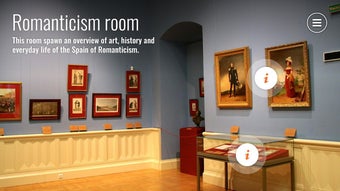

Download 3DVista APK – Virtual Tours, Android App, 3D Experience, Real Estate, Architecture, Offline Access
Overview
3DVista is a free Android application developed by 3DVista España, designed to bring virtual tours to users on the go. The software enables individuals to access previously created virtual tours anytime, whether online or offline, offering uninterrupted exploration of 3D environments. It is particularly useful for professionals such as real estate agents, architects, and tour guides who require a portable, reliable way to showcase projects during client meetings, site visits, or presentations.
The app supports synchronization with existing 3DVista hosting accounts or VistaZoo accounts, allowing seamless access to personalized content. Users can also play tours directly from their SD card, providing flexibility in content management and storage. The application’s core purpose is to extend the reach and usability of 3DVista-created tours beyond the desktop environment.
While the app does not support the creation of new tours, it serves as a dedicated viewer for tours produced using the 3DVista desktop software. This makes it a complementary tool rather than a standalone solution. The developer did not provide additional details about the app’s development background or broader company initiatives.
Real-world usage scenarios include on-site property walkthroughs, architectural presentations, and mobile-guided tours in museums or heritage sites. The app’s ability to function offline ensures usability in areas with limited connectivity.
Key Features & Capabilities
- Offline Access to Virtual Tours – Users can view 3DVista-created tours without an internet connection, making it ideal for remote locations or presentations with no network access.
- Account Synchronization – The app supports login via existing 3DVista hosting or VistaZoo accounts, enabling automatic syncing of tours and updates across devices.
- SD Card Integration – Tours can be stored and played directly from the device’s SD card, allowing users to manage large files and organize content independently of cloud storage.
- User-Friendly Interface – The app features an intuitive layout that simplifies navigation between tours, with easy access to categorized and recently viewed content.
- Discovery of Public Tours – Users can browse and explore virtual tours created by other individuals, offering inspiration and reference material for professional or personal use.
These features are particularly beneficial for professionals who rely on immersive visual content to communicate design intent or property details. For example, a real estate agent can load a tour of a property onto their SD card and present it during a site visit without needing to connect to the internet. Similarly, an architect can use the app to walk a client through a building model during a meeting, enhancing client engagement.
The ability to access both personal and public tours ensures a rich, dynamic experience. However, it is important to note that the app only functions with tours previously created using 3DVista software, which limits its utility for users without access to the desktop authoring tool. This dependency ensures consistency in quality and format but may present a barrier for new users unfamiliar with the 3DVista ecosystem.
User Interface, Workflow & Performance
The user interface of 3DVista is designed with simplicity and functionality in mind, featuring a clean layout that emphasizes ease of navigation. The main screen displays a grid or list of available tours, categorized by type, date, or user preference. Users can quickly browse through their synchronized content or explore public tours available through the app’s discovery feature.
Navigation between scenes within a tour is smooth, with intuitive touch controls for movement and interaction. The workflow is streamlined, allowing users to launch a tour with minimal steps, making it suitable for use in time-sensitive professional environments. The developer did not specify resource usage details, so exact performance metrics such as CPU or RAM consumption are not available.
However, based on general behavior of similar 3D viewing applications, the app is expected to perform efficiently on modern Android devices with adequate processing power and graphics support. Stability during extended use was not detailed in the provided information. The app supports both online and offline modes, with seamless transitions between them, ensuring uninterrupted access to content.
Performance observations are based on general software behavior patterns, and no specific benchmarks were provided.
Compatibility & System Requirements
3DVista is compatible with Android devices and is available as an APK file for download. The app supports both online and offline usage, allowing users to access tours regardless of network availability. The installation size was not specified in the provided information.
Exact system requirements were not listed, so users are advised to ensure their device meets the minimum standards for running Android applications with 3D rendering capabilities. The developer did not provide details about supported Android versions, screen resolutions, or hardware acceleration requirements. Compatibility information was partially provided, and users should verify device compatibility before installation.
The app does not require a specific processor or GPU, but optimal performance may depend on the device’s graphics processing unit and available memory. The developer did not specify whether the app supports tablet or phone form factors exclusively. For users seeking detailed technical specifications, additional information may be required from the official source.
Pros and Cons
Pros
- Free to download and use with no in-app purchases
- Supports offline viewing of virtual tours
- Seamless synchronization with 3DVista and VistaZoo accounts
- Direct playback from SD card for flexible content management
- Intuitive interface suitable for professionals and casual users
Cons
- Only works with tours created using 3DVista desktop software
- No information on minimum system requirements or supported Android versions
- Requires prior use of 3DVista software to generate content
- Developer did not provide performance or stability details
- Limited to Android platform; no support for iOS or desktop
FAQ Section
Is 3DVista available for iOS devices?
Currently, 3DVista is only available for Android devices. The developer did not provide information about iOS compatibility or future plans for other platforms.
Can I create new virtual tours using the 3DVista app?
No, the app does not support the creation of new virtual tours. Tours must be previously created using the 3DVista desktop software.
Is the app safe to download and use?
3DVista is a free application developed by 3DVista España. It does not contain in-app purchases or ads. Users should download the APK from trusted sources to ensure security.
How do I update the app?
Updates are available through the official website or trusted APK distribution platforms. Users should check for the latest version before installation.
Can I use the app without an internet connection?
Yes, the app supports full offline functionality. Once tours are downloaded or stored on the SD card, they can be accessed without an internet connection.
Final Thoughts + CTA
3DVista delivers a focused and practical solution for professionals who rely on virtual tours as part of their workflow. Its ability to provide offline access, seamless account synchronization, and SD card integration makes it a valuable companion to the 3DVista desktop ecosystem. While it lacks content creation capabilities and has limited public information on system requirements, its strengths lie in reliability, ease of use, and platform-specific optimization.
The app is particularly well-suited for real estate agents, architects, and tour guides who need to present immersive content in diverse environments. For users already invested in the 3DVista software suite, this mobile viewer is a must-have tool for on-the-go presentations. Despite its limitations, the app’s free model and strong functionality make it a compelling choice in the mobile virtual tour space.
Download 3DVista now to bring your virtual experiences anywhere, anytime.





.png)

